
Updating withholding tax rates in SAP Business One is necessary when tax regulations change or when company policies require adjustments. A proper SAP B1 withholding tax update ensures new transactions apply the correct rate while preserving historical records for compliance and reporting.
In this guide, we explain how to update withholding tax rates in SAP Business One and what happens after the change.
🎥 Watch the step-by-step tutorial below:
Where to Update Withholding Tax in SAP Business One
To begin the SAP Business One withholding tax setup update, go to:
Administration → Setup → Financials → Tax → Withholding Tax
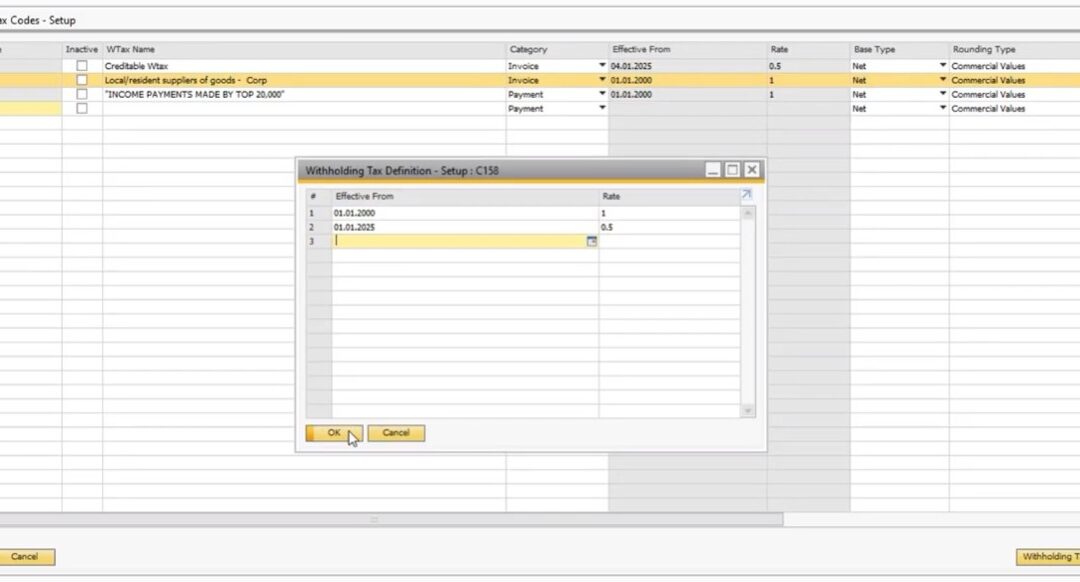
In the Withholding Tax Code Setup window, locate and highlight the tax code you want to update. Right-click the row and select Withholding Tax Definition.
Enter the new tax rate and the effectivity date, then click Update to save.
What Happens After Updating Withholding Tax Rates
When performing a withholding tax rate update in SAP B1, the changes apply only to new transactions created after the update. Existing transactions remain unchanged as part of the system’s historical financial records.
This ensures audit integrity while allowing companies to comply with new tax rates moving forward.
Keeping SAP Business One withholding tax configuration up to date helps maintain compliance, accurate reporting, and correct tax postings across the system.
If you need assistance with SAP B1 tax configuration, consult your SAP partner or support team.